|
Author: Colin Klinkert  |
  |
|
 |
|||
 ReviewTrust, sometimes spelled Review Trust, is a system that automates the tedious process of collecting, gathering and displaying customer testimonials directly on your website. This will help you save time, and thus money, but also achieve higher conversion rates and more sales, without changing your sales message. This is how ReviewTrust is advertised, but does it really do all of this? Short answer: yes, but let’s review this program in more details…
ReviewTrust is useful for:
– Consumers – they can read customer testimonials, and know they are real and verified… With the ReviewTrust brand, they would know these people are verified buyers and the testimonials are real.
– Business owners (like you) – you can automate the tedious process of collecting testimonials, easily add them to your website, as well as increase visitor trust and make more sales.
ReviewTrust is in charge of emailing your customers (and following up with them), collecting the testimonials, delivering bonuses (which is optional) and displaying these testimonials on your website. As you can see, it is a 100% automated system. Once it’s set up, all you need to do is sit back, relax and wait for the testimonials to come in. You can choose to approve them, so they are displayed on your website, or hide them.
Here is how ReviewTrust works:
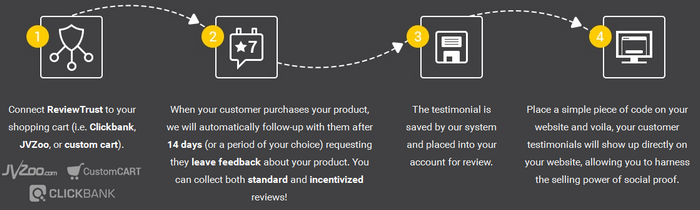
ReviewTrust is a Web-based application. There is nothing to download and install. To get started, all you need to do is to create a campaign. Don’t worry, it’s super easy. This shouldn’t take you more than a few minutes… ReviewTrust allows you to connect to ClickBank, JVZoo, UltraCart and Limelight. You can also import your customer list from other services that are not integrated in the system. The campaign creation form allows you to fully customize the process. For example, you can choose whether you want to ask your customers to upload an image or not, provide them with a bonus (incentivized offer) or not, etc.
You can also edit the emails your customers will receive, and decide when they should receive them: X number of days after the previous one, etc. These are the emails asking them to please leave a testimonial. Imagine doing this yourself… This is a huge time-saver! ReviewTrust even provides you with email copies that they have tested and improved over time.
What we like the most is the testimonial form, where your customers land after clicking the link in the email. This form has been fully optimized. The review system is actually based on Amazon’s review system, so it’s a tested and proven system. Amazon must have spent hundreds of thousands of dollars developing and customizing this system. Well, now you can use the same one.
In short, this page shows you a star rating system, but it’s only after you have clicked a star (e.g. 5 stars out of 5) that the text field asking for the testimonial shows up. Then comes the text field for the title, and so on. Very clever, if you ask us, because that way the customer doesn’t feel overwhelmed.
Then, all you need to do is to approve or hide the testimonials you have received. The ones you approve will automatically appear on your website, and the ones you hide will not, but they will be saved. In case you want to use them later, and maybe even reply to these unhappy customers…
Of course, you can choose how you want to display the testimonials on your website. ReviewTrust provides you with a selection of widgets (of all sizes) that you can easily embed on your website. These widgets are very well designed, and can be modified and placed pretty much anywhere, in just a few clicks. This will greatly improve visitor trust, and increase your conversion rates and sales.
Click here to get started… This is the best testimonial system we have ever seen. Period. Seriously, it’s a no-brainer… It’s super easy to set up and will boost your conversion rates and sales in no time. ReviewTrust was created by Brad Callen, who’s been in the business for many years, so you can be assured that the product will be supported over time, unlike many other products out there.

>>> Click Here to Get ReviewTrust Now <<<
& Boost Your Conversion Rates & Sales in NO Time!
ReviewTrust Bonuses (Total value: $997)
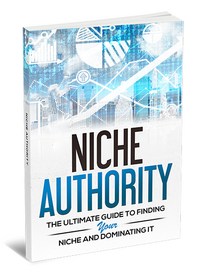 Don’t have a product? You’re in luck, because if you get ReviewTrust through our special link, we will send you not 1, not 2, not 3, not 4 but 5 cool bonus products that you can resell or give away! (Total value: $997)
Niche Authority – The Ultimate Guide to Finding Your Niche & Dominating it
Affiliate Authority – How to Get Rich Selling Other People’s Products
Blog Authority – A Simple Step-by-Step Guide on How to Start a Blog For Profit & Build a Raving Community
Brand Authority – How to Be Everywhere, Stand Out From Your Competition & Build an Incredible Brand
Social Media Authority – How to Establish Your Online Presence, Reach More People, Gain The Trust & Loyalty of Your Audience
Here is what’s included with each product:
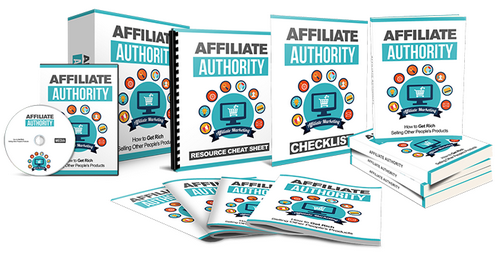 – eBook
– Checklist
– Resource Cheat Sheet
– Mindmap
– Sales Page
– Optin Page
– Graphics
– Articles
– Email Swipes
– Social Media Images
– & More…
 You will be able to:
* resell these products (for a minimum price of $7 each)
* add them to your paid membership site
* give them away as a bonus when people buy through your affiliate link
* edit the included sales and optin pages
* & more…
How to Claim Your Bonuses:
To claim your bonuses, all you need to do is to get ReviewTrust through this special link and then submit a ticket here. Please use “ReviewTrust Bonuses” as a subject and make sure you include the transaction details so we can verify your purchase.
Step #1 – Get ReviewTrust using this special link
Step #2 – Submit a ticket here using “ReviewTrust Bonuses” as a subject and with your transaction details
That’s it! We will get back to you within 24 business hours. Please note that we WILL take this bonus offer down in a little while so don’t wait any longer!
|
Author: Colin Klinkert |
|
|
|
|||
 The SEO landscape has been turned upside down for the past year and half, as Google implemented their Panda and Penguin updates. Qualitative methods have prevailed over quantitative methods. Foundational strategies that have worked for a decade have become useless. A lot of people gave up on SEO and ended up losing their business, and everything they had worked for for many years, but like Albert Einstein said: “You never fail until you stop trying.”
I wrote this short introduction hoping to convince you to not give up. If you give up, what are you going to do? What about your dream of succeeding online? SEO is not dead like some people say, it has just changed. This is exactly what SEO expert Matt Callen explains in his Traffic Recon video course: proven traffic generation and SEO methods, in a way that makes sense, and can be applied to your business, immediately.
Here is what you will find in Traffic Recon:
– Introduction to the Traffic Recon Course
– The Influence of Panda and Penguin
– The Simple Stuff Becomes More Important Today
– Off Page Factors are Still King
– Understand and Mimic Your Competition
– Introduction to Tiered Link Building
– Applying Tiered Linking – Tier 1
– Applying Tiered Linking – Tier 2
– Applying Tiered Linking – Tier 3
– Automation
These are the hottest SEO topics of 2013 and Matt covers them ALL, in simple words. Let’s take a few examples… In ‘The Influence of Panda and Penguin’, he talks about the mistakes people made through the Panda and Penguin updates, to help you future proof your sites for changes Google may roll out. This is not only about what’s working now, but also about what is going to work in the future.
In ‘Off Page Factors are Still King’, Matt explains why off page and link based factors are still important, and will always be a major part of SEO. He also covers a topic that is highly important to me: social signals. You know how it important it is to optimize (and not over-optimize) your site and build links from different sources, but do you know about the importance of social signals? If not, you are about to find out…
Another very important topic Matt covers in this course is tiered link building. If you fail to understand this concept and correctly apply it, you will never succeed with your online business… This is Link Building 2.0, but don’t get me wrong… This is NOT an advanced technique. This is actually pretty simple, if you understand the basics and know what to do, which is exactly what you can learn with Traffic Recon.
Matt covers a lot more topics, and I won’t talk about them here. Simply know these are the most important topics if you want to succeed with SEO in 2013. The best part is that the course is very easy to follow. Whether you are a complete beginner or seasoned at SEO, this course is useful because it’s about what is working now and what is going to work in the future. The Panda and Penguin updates have taught us a lot.
When Matt first told me about this course, I will a little skeptical, even though I know he is an expert at SEO. I checked it out and I must say I was quite impressed. No bullshit, no fluff… This goes straight to the point. I’m very excited about it because it answers a lot of questions you and other people ask themselves. Trust me, if you follow this course, you will know more than a lot of people who claim they are SEO experts.

>>> Click Here to Join Traffic Recon <<<
& Learn How to Control Your Traffic in 2013
Traffic Recon Bonus
If you get Traffic Recon through my special link, I will send a great video on what’s working for me in SEO now (valued at $97). I will tell you about my own methods and what works for me in 2013. To claim your bonus, all you need to do is to get Traffic Recon through my special link and then submit a ticket here. Please use “Traffic Recon Bonus” as a subject and make sure you include the transaction details so I can verify your purchase. Once I have all these details, a member of my team will reply to you with the link to the video within 24-48 hours.
|
Author: Colin Klinkert |
|
|
Comments Off on Traffic Recon Review & Bonus |
|
||

The best part is that P1 Content Magnet will give you suggestions on what to improve and should be done to get your posts to the top of Google rankings. This is by far the best feature because it’s great to see what could be improved but not everyone knows how to do it. With this plugin, you will know exactly what keywords you should use to rank higher in Google. Check out these few screenshots to see how the plugin looks like…
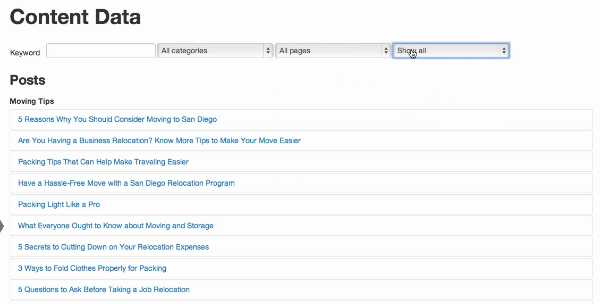
For example, maybe the primary keyword is not the keyword you actually want to rank for in Google. You might have over-used a keyword that Googlebot sees as your primary keyword… If the post doesn’t have any image, you might want to add one to have better chances of ranking high in Google. Google likes content with images (and videos). Maybe the number of words is too low for the post to be at the top of Google rankings…
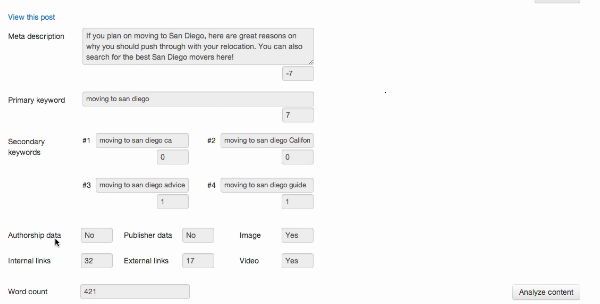
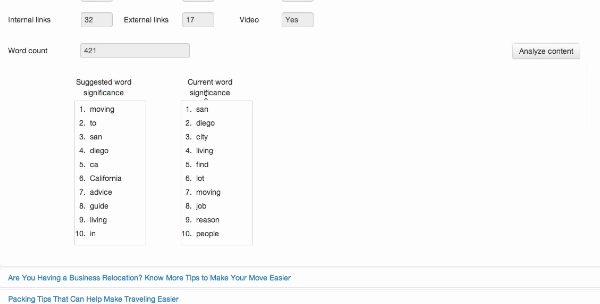
It also comes with a ‘Progress Tracker’ feature that, as the name suggests, tracks not only your current rankings but the progress of your rankings. In this section, you will be able to see your previous rankings (before you made the changes) and your current rankings (after you made the changes). This is a great feature because it helps you see if the changes you made were useful, and how your posts perform in Google.
There is also a ‘Manual Tracking’ feature that lets you track your rankings in specific countries, so for example if you want your posts to rank in Google Australia or Google Germany, you will be able to track rankings in Google.com.au and Google.de respectively. The plugin even lets you add external URLs, so it doesn’t only track the rankings of your posts, but also of other URLs like your YouTube videos for example…
 The man behind this powerful WordPress plugin is no less than Peter Garety, an SEO expert specialized in WordPress. Peter truly is an expert when it comes to SEO on WordPress, so you can be sure P1 Content Magnet does exactly what it should and that the suggestions it gives are relevant and accurate. Peter has already helped thousands rank their WordPress site or blog in Google… You could be next!
Click the link below to get P1 Content Magnet… I installed it on several of my sites and am really glad I did! I found quite a few keywords I haven’t thought of and could rank for… This is one of the best WordPress plugins of 2013, if not the best! I have also prepared a great bonus for you so make sure you check it out…
>>> Click Here To Get P1 Content Magnet <<<
& Start Doing SEO The Right Way!
P1 Content Magnet Bonus
 If you get P1 Content Magnet through this special link, I will send my Secret Web Assets Report (currently selling at $9, click here for proof) as well as access to my tutorial videos, over-the-shoulder videos and bonuses (Pro upgrade, currently selling at $47), FREE! That’s right… By simply skimming through the Report, you will know more about SEO than 95% of people who say they are SEO experts, and the videos will show you exactly what I do to rank my sites for pretty much any keywords!
To claim your bonus, all you need to do is to get the P1 Content Magnet WordPress plugin through this special link and then submit a ticket here. Please use “P1 Content Magnet Bonus” as a subject and make sure you include the transaction details so I can verify your purchase. Once I have all these details, a member of my team will create an account on Secret Web Assets for you and reply to you.
It’s simple:
Step #1 – Get P1 Content Magnet using this special link
Step #2 – Submit a ticket here using “P1 Content Magnet Bonus” as a subject and with your transaction details
That’s it! A member of my team will get back to you within 24-48 hours with your login details to access the Secret Web Assets Report and Pro upgrade. It won’t cost you a single cent! Please note that I will probably take this bonus offer down in a little while so don’t wait any longer!
 |
Author: Colin Klinkert |
|
|
Comments Off on P1 Content Magnet Review & Bonus |
|
||
Topics covered:
00:32 Split testing the SocialMonkee homepage
01:29 Comparing conversion rates in Google Analytics
02:40 The change made to the homepage
04:40 Creating a new experiment in Google Analytics
07:51 What to split test (Part 1/2)
09:13 Split testing with social proofing (with VeriPurchase)
10:38 How to set up the split test code
13:30 What to split test (Part 2/2)
Here is the link to VeriPurchase for the 14 day trial to see if it boost your conversions: http://www.veripurchase.com/
Interesting quotes:
“If you are not split testing your website, you really are leaving money on the table.” Tweet This Quote
“Only make one change at a time if you are going to do a simple A/B split test.” Tweet This Quote
“I have prepared another split test that we are going to start running, and the reason I am doing this is that we can actually show you how you can set up your own inside Google Analytics…”
“There is an issue, and this is what is so great about this. It’s really dummy-proof…” Tweet This Quote
What We Cover In The Video Above:
Whether or not you are happy with the way your landing pages perform, we highly recommend that you run some A/B split tests. We haven’t run any for a long time on some of our sites (we constantly do on a few of our main ones) and have left a lot of money on the table… Don’t worry though, it’s a lot easier than it sounds.
It used to be a little complicated but with Google Analytics it’s now a lot simpler. A/B split testing doesn’t necessarily involve major changes. Sometimes a few minor changes can make a big difference.
In this video, we talk about a recent split test we ran for the SocialMonkee homepage. We compare conversion rates, and talk about the change we made. We then show you how to create a new experiment in Google Analytics, so you too can run split tests.
We also briefly discuss what to split test and show you how to set up the split test code. The best part is that once you know how to run split tests, you will actually enjoy doing it!
|
Author: Colin Klinkert |
|
|
|
|||
If like me you often want to add graphics to your posts or pages but don’t because you either don’t have the time or skills, make sure you check out this free graphic design software I give away…
WP Design Boxes is a FREE WordPress plugin that allows you to create graphics for your site or blog in just a few clicks. All you need to do is to install the plugin, create a graphic, customize it to your liking, copy the code and paste it wherever you want to place it on your site or blog.
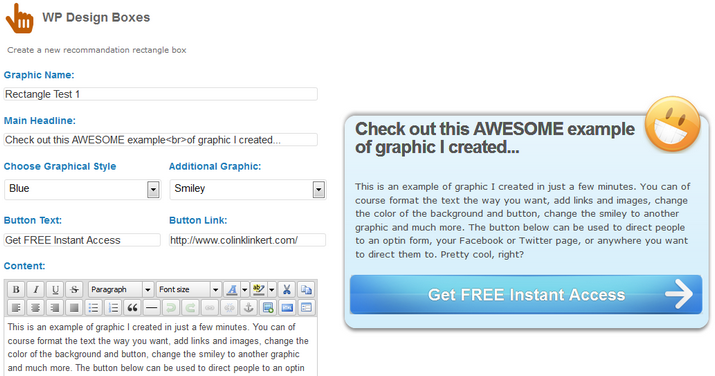
With this plugin, you can create graphics to direct people to an optin form, to your Facebook or Twitter page, or to an offer or even payment page… In short, pretty much anywhere you want! I love it because it’s so easy to use, and there are enough options to make it nice and eye catching, without having to spend more than a few minutes on this… Here is an example of rectangle graphic I created in just a few minutes:
Check out this AWESOME example of graphic I created...

This is an example of graphic I created in just a few minutes. You can of course format the text the way you want, add links and images, change the color of the background and button, change the smiley to another graphic and much more. The button below can be used to direct people to an optin form, your Facebook or Twitter page, or anywhere you want to direct them to. Pretty cool, right?

Check out out it looks from the inside… As you can see, all you need to do is to give the graphic a name (so you can edit later if you want to), write a headline, choose the background style, change the graphic at the top right, change he button text, change the button link, add content and format it the way you want and much more… That’s if it’s a rectangle graphic.

You can of course do the same thing to promote your Twitter page, Google+ page, Pinterest page… Here, I place them on a post, but you can place them anywhere you want on your site or blog. For example, if you have an optin form, you might want to ask people to check out your Facebook or Twitter page on the subscription confirmation page (after they opted in). No doubt you would get more clicks with nice, eye-catching graphics than just text links…
You can create an unlimited number of rectangle graphics, square graphics and banner graphics, and you of course have the option to edit already existing graphics. This so much easier than creating them yourself in Photoshop or Paint Shop Pro (I don’t know how to do that anyway!) and a lot less expensive than hiring a graphic designer to do it for you… If you already have a graphic designer working for you, it will save (him or her) time and (you) money.
How to Get This Free Graphic Design Software?
This free graphic design software can be obtained by entering your first name and best email address in the form below… It’s easy to install, easy to use, and doesn’t require that you learn or do anything complicated. You will also receive occasional email updates from me, with my best advice and tips on how to start, run and grow your own online business (which sounds less sexy but is even more valuable)…
If you have any questions, suggestions or feedback, feel free to leave a comment below!
|
Author: Colin Klinkert |
|
|
|
|||

I know Chris Munch personally so I always get early access to his products… I was quite excited when he first told me about his new social plugin called Wookle. He actually asked me to write a review for it, whether I like it or not. That’s a risk he took, because I only write unbiased reviews, but if you know your product is good, I guess it’s not really a risk! Alright, it’s now Wookle review time…
In short, Wookle is a plugin (for WordPress, but it can also work on other types of sites) that puts social buttons on your posts and/or pages so people can click them and share your content on top social networking platforms including Facebook, Twitter, Pinterest and StumbleUpon. The setup process works like a charm: you install the plugin just like any other plugin, and you choose the settings you want to use…
This plugin is highly customizable. There are plenty of different options and settings but overall it remains very easy to set up. Actually, it took me less than 10 minutes to install the plugin and set it up like I wanted. The idea behind this plugin is to entice people to share your content, so your site gets social signals, which are very important, not only for users, but also for the search engines. Social signals give some authority to your content…
Are Social Signals Important?
For me, social signals are as important as backlinks. With backlinks, you get ‘link juice’, which is highly useful to rank well in the search engines. With social signals, you get ‘social love’, which also helps a lot… Imagine a couple of posts, on the exact same topic. The 1st one only has a few social signals, and the 2nd one a lot of them. Which post is Google more likely to rank well? Which post are people more likely to read if they had the choice? I don’t think I need to answer these questions…
I installed it on my blog and placed the buttons at the bottom of posts and pages. Here is how it looks:

Wookle comes with a bunch of text and image buttons, but you can also upload your own ones. With text buttons, you can easily change the text content, so for example you could have buttons that say: I Like This!, I Love This!, I Hate This!, I Don’t Care!, I Want One!, I Have One!, I Ordered One!, Great Value!, Interesting!, Awesome!, Unbelievable!, Crazy!, This Is Great!, This Is Perfect!, A Must Read!, Hilarious!, etc.
Here are the available text button designs:
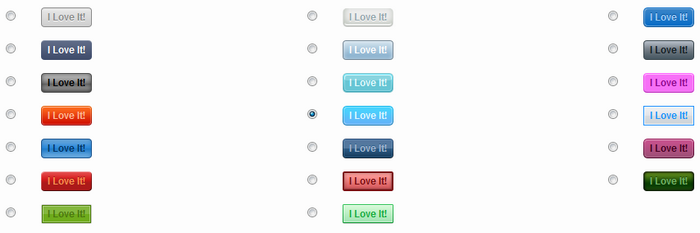
Here are the available image button designs:
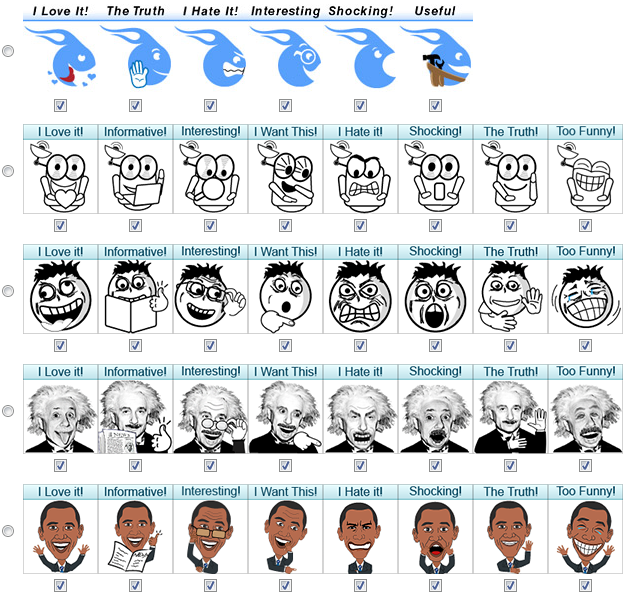
You can also choose to direct users to either Facebook, Twitter, Pinterest or StumbleUpon, or show them a window where they can choose which social networking platform they want to be directed to. If you use Facebook, you can create a Facebook App so in the message that appears on Facebook, it shows the name of your choice (“via…”) instead of “via Wookle”. I thought this would be complicated to set up but it actually took me 2 minutes. A piece of cake! The plugin comes with step-by-step instructions for everything you might want to do. You simply cannot go wrong…
You can also show message counts (the number of clicks each message has received) and a most popular message (most popular message for a given post or page), change the preamble (Facebook It!, Did You Like This Post? What Do You Think Of This Post?, etc.), exclude posts, pages, tags and/or categories… You can show buttons at the top of all posts and/or pages, or at the bottom, or use the custom code and place them wherever you want. The best part is that Wookle works seamlessly on any site, whether it uses WordPress, Joomla, Drupal, OSCommerce, phpBB, Microsoft NET, HTML…
Don’t Use WordPress?
If you don’t use WordPress, don’t worry… Wookle uses a simple Javascript-based interface. Everything is explained in simple words in the documentation provided with the plugin. Using Wookle on a non-WordPress site is as easy as using it on a WordPress site. I forgot to mention… You can get a single site license, multi site license or unlimited site license, so you can even offer this as a service to your clients if you want to.
My Final Words
My Rating: 
The only reason it gets a 9 and not a 10 is because I’m jealous… Why didn’t I think about this simple yet amazingly powerful plugin myself? Alright, that’s not a valid reason… The real only reason it doesn’t get a 10 is because I think there are not enough image buttons that come with the plugin. A few more generic image buttons would have been great, and that’s only a small downside, and is not really a problem provided you can upload your own ones if you want to.
Wookle is the only technology on that market that taps into the emotions of users and lets them indulge their favorite online pastime: sharing their opinions and expressing their emotions. Click here to get a Wookle license now, for massive viral exposure, to boost your social signals for higher rankings, and bring you more traffic… and higher profits!
>>> Click Here to Get Wookle Now <<<
& Boost Your Social Signals, Search Engine Rankings & Traffic!
P.S. – Please click either of the buttons located below to see how the plugin works:
 |
Author: Julien |
|
|
Comments Off on Wookle Review – Is It As Good As They Say? |
|
||
Latest Update For Version 10 of Spin Rewriter (2019)
IMPORTANT: This is a review of Spin Rewriter. The latest version (Spin Rewriter 10) was released on October 10, 2019. Here is what’s new:
- They’re rolling out a complete modern redesign, after 8 years!
- They’ve worked with some of the best UI/UX designers to make the redesign a success
- They’re making Spin Rewriter simpler, more powerful and mobile-friendly
- They’re bringing a massive leap forward in semantic analysis (i.e. extraction of meaning)
- As well as a 3-year leap forward in advanced sentence structure manipulation technology
- They’ve done a manual review of the synonym database (more than 400 man-hours invested)
- ENL Semantic Spinning can now manipulate the tense of specific sentence parts
- They’ve greatly improved integration with free stock photo and video websites
- They’ve improved the on-boarding process for first-time users
>>> Click Here to Try Spin Rewriter FREE For 10 Days <<<
Latest Update For Version 6.0 of Spin Rewriter (2015)
IMPORTANT: The latest version (Spin Rewriter 6.0) was released on October 14, 2015. Here is what’s new:
– They’ve rolled out a huge leap forward in meaning-extraction and synonym-selection, for more unique and readable spun content.
– An even bigger leap forward in sentence structure manipulation.
– They’ve invested close to a 1000 man-hours of work into redesigning and improving the user interface. Spin Rewriter 6.0 is super easy to understand, quick, responsive, and with helpful dialogs along the way.
– They’ve integrated WordPress, so you can now post to WordPress websites directly from your Spin Rewriter account in just a few clicks.
– They’ve rolled out native Android and iPhone (iOS) mobile apps with a very finger-friendly user interface.
– They’ve added a new option for old Gold members (upsell) to set up limited access for their VA’s.
Past Update For Version 5.0 of Spin Rewriter (2014)
IMPORTANT: The latest version (Spin Rewriter 5.0) was released on October 21, 2014. Here is what’s new:
– You can now fetch relevant seed articles for spinning in just a few seconds, from a huge built-in database of 126,000+ high quality articles.
– The processing speed has been improved by 80%, from 5 secs down to 1 sec for an average length article.
– The 1-click rewrite of a 500-word article doesn’t take 120 secs anymore, but just 9 secs!
– They have built in an industry-leading grammar and spelling checker with 1-click functionality.
– You can now automatically insert relevant You Tube videos into the articles you fetch, in just a few seconds.
– You can have the paragraphs and lists in your generated articles intelligently re-ordered on total autopilot.
– More awesome features…
Past Update For Version 4.0 of Spin Rewriter (2013)
Spin Rewriter 4.0 comes with plenty of new features and benefits, including an article generating algorithm that makes sure only appropriate synonyms are used. Spin Rewriter now spins content on paragraph, sentence and word levels, and has become the best article spinner in the world!
Demo Video (Watch The New Features in Action!)
>>> Click Here to Try Spin Rewriter FREE For 5 Days <<<
SpinRewriter Bonus (Total value: $997)
Don’t have a product to promote? You’re in luck, because if you get SpinRewriter through our special link, we will send you not 1, not 2, not 3, not 4 but 5 cool bonus products that you can resell or give away! (Total value: $997)
Niche Authority – The Ultimate Guide to Finding Your Niche & Dominating it
Affiliate Authority – How to Get Rich Selling Other People’s Products
Blog Authority – A Simple Step-by-Step Guide on How to Start a Blog For Profit & Build a Raving Community
Brand Authority – How to Be Everywhere, Stand Out From Your Competition & Build an Incredible Brand
Social Media Authority – How to Establish Your Online Presence, Reach More People, Gain The Trust & Loyalty of Your Audience
Here is what’s included with each product:
– eBook
– Checklist
– Resource Cheat Sheet
– Mindmap
– Sales Page
– Optin Page
– Graphics
– Articles
– Email Swipes
– Social Media Images
– & More…
You will be able to:
* resell these products (for a minimum price of $7 each)
* add them to your paid membership site
* give them away as a bonus when people buy through your affiliate link
* edit the included sales and optin pages
* & more…
How to Claim Your Bonuses:
To claim your bonuses, all you need to do is to get SpinRewriter through this special link and then submit a ticket here. Please use “SpinRewriter Bonuses” as a subject and make sure you include the transaction details so we can verify your purchase.
Step #1 – Get SpinRewriter using this special link
Step #2 – Submit a ticket here using “SpinRewriter Bonuses” as a subject and with your transaction details
That’s it! We will get back to you within 24 business hours. Please note that we WILL take this bonus offer down in a little while so don’t wait any longer!
 Oh, I almost forgot. There is ANOTHER BONUS…
Spinning still works, if done correctly. If you do it wrong, it just won’t work. If you do it right, on the other hand, it will help you generate tons of content fast and inexpensively. This is why I created a PDF guide and a 20 mins tutorial video to show you how to spin content correctly. If you get Spin Rewriter through my link, I will send you both as an additional bonus, at absolutely no cost!
 If you sign up now, you will get access to a recorded Google Hangout on how to best use Spin Rewriter and the best practices of spinning with Aaron Sustar, the creator of Spin Rewriter! You will learn how to use his software for the highest quality ouput, why spinning still works and how to do multi-level spinning… Click here to get Spin Rewriter 6.0 now!
>>> Click Here to Try Spin Rewriter FREE For 5 Days <<<
My Full Spin Rewriter Review From Last Year:
Three years ago you would have asked me what article spinner I would recommend, my answer would have been no longer than three words: The Best Spinner. At the time, The Best Spinner was by far the best article spinner. (Read our The Best Spinner review for more details…) The only downside was that it only works on PC, which is a problem for people like me who are on Mac. Now if you ask me what article spinner I recommend, I would have two answers for you. The Best Spinner is still a great choice, but I would first recommend Spin Rewriter. As a matter of fact, I now prefer using Spin Rewriter to using The Best Spinner. Let me tell you why…
…but first, let’s talk a bit about article spinning in general. Why would you want to spin your articles? Google doesn’t like duplicate content, and it makes sense, because if one piece of content already ranks well in Google, why rank the exact same content again? The goal of article spinning is to get more from your article. If you spin your article well, you could have plenty of unique, readable versions. All generated articles will be seen as unique by the search engines. There’s only one problem: if you want to do it well, it’s very time consuming, UNLESS you use an article spinner. That’s where Spin Rewriter comes in!
Spin Rewriter – Is This The Best Article Spinner?
Spin Rewriter has quickly established itself as one of the top article spinners available on the market. I found out about it on the Warrior Forum… I like to try new things out, so I signed up and quite liked it. I gave access to my team, and they loved it. Yes, there were a few flaws, but overall the product was quite good when it first came out. Almost three years later, Aaron – the guy behind the product – has released Spin Rewriter, which comes with new features and added benefits, as well as a detailed step-by-step SEO blueprint valued at $97.
The new version of Spin Rewriter uses ENL semantic spinning technology, which is not available anywhere else on the market. What it does it that it does not just analyze words but also sentences and paragraphs, and spin all of them accordingly. Does it sound too good to be true? Well, trust me, that’s what I thought too until I gave the new version a try. Let’s take an example…
Sentence 1
– John can relax and read a book because his kids can book the vacation for him.
Here most article spinners would not make the difference between ‘book’ and ‘book’ but Spin Rewriter does. Here is how Spin Rewriter would spin this word:
– {book|novel|magazine|publication}
– {book|make a reservation|reserve|set up|schedule|organize}
Spin Rewriter also understands the actual role each word plays in a sentence:
Sentence 2
– Once it’s booked, he will enjoy an excellent movie and drink wine, beer, or whiskey.
Here is how Spin Rewriter would spin this word:
– {wine, beer, or whiskey|wine, whiskey, or beer|beer, wine, or whiskey|beer, whiskey, or wine|whiskey, wine, or beer|whiskey, beer, or wine}
This is a common practice among article spinners, as it’s an easy way to get multiple variations without too much work, but with other services you would have to do this manually, which is not hard but a little time consuming. Here, Spin Rewriter does it all for you. Imagine how much time you will be saving over time… Hours of boring, mindless work!
Spin Rewriter has the unique ability to recognize the actual role of each word (subject, object, adverb, etc.) and can re-organize the entire structure of your original sentences. This hasn’t been seen before and is what really makes Spin Rewriter unique.
Sentence 1 (Again…)
– John can relax and read a book because his kids can book the vacation for him.
Here is how Spin Rewriter would spin this sentence:
– {Since John’s children are able to schedule the holiday for him, he can easily flip through a novel and rest.|Because his kids can easily set up the trip for him, John is able to skim a magazine and take it easy.|John is able to go through a publication and unwind since his children can schedule the getaway for him.}
As you can see, Spin Rewriter can change ‘X because Y’ to ‘Y, because X’ itself. In that sentence, it also changed ‘relax and read a book’ to ‘read a book and relax’. Spin Rewriter knows that the word ‘book’ belongs to the verb ‘read’ and then it switches around the verbs ‘read’ and ‘relax’.
If you’re still not sure how it works, check out the video they made:
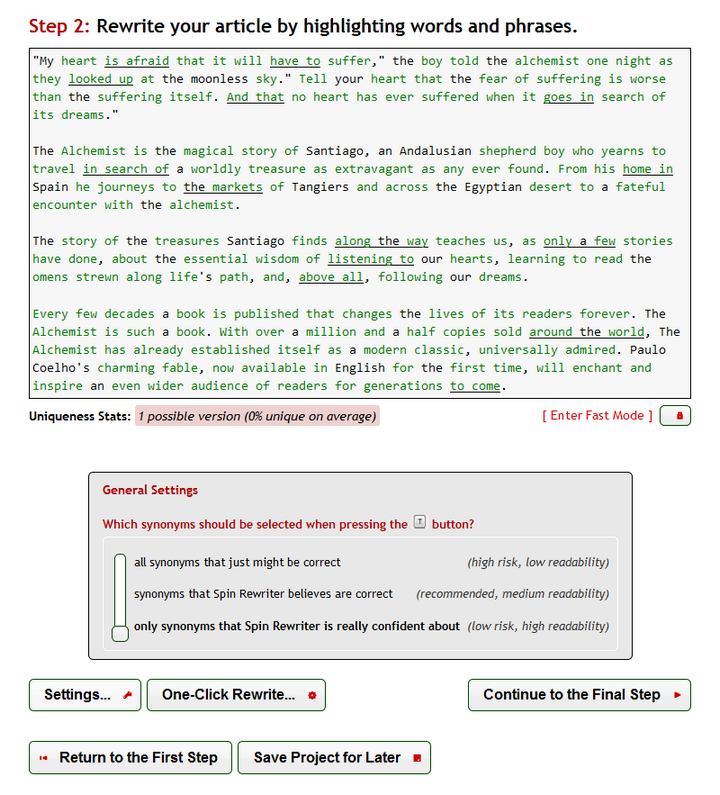
As you can see you can choose between 3 general settings: (1) all synonyms that just might be correct (high risk, low readability), (2) synonyms that Spin Rewriter believes are correct (recommended, medium readability) and (3) only synonyms that Spin Rewriter is really confident about (low risk, high readability). My team and I personally use the 3rd option, because we don’t mind adding a few synonyms ourselves if we feel there are not enough, but the 2nd option is great in all cases.
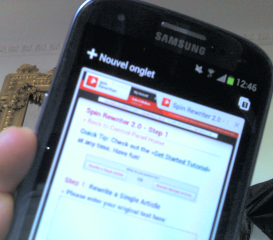
What I really like about Spin Rewriter is that I can use it from anywhere, whether I’m on PC or Mac. Spin Rewriter is hosted online, which means you don’t have anything to install. That’s great for someone like me. I sometimes like to use it myself (I’m on Mac), my VP sometimes uses it too (he’s on PC), and my VAs of course use it (they’re on PC). All of us can use it from our desktop computers, laptops and even smartphones and tablets! Check out how it looks on Galaxy S3… Pretty neat, right? Now you might ask yourself if people would really use Spin Rewriter on their smartphone or tablet? Probably not many, but when I travel short distances I like to bring my iPad with me instead of my laptop. I never had to use Spin Rewriter when travelling, but if I needed to I could!
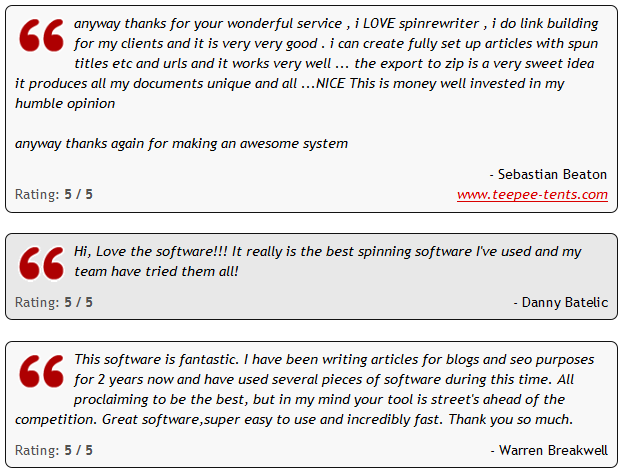
Check out what other people think about Spin Rewriter:
The video was pretty compelling, so I decided to try it out and I am absolutely shocked at what Spin Rewriter is capable of. It’s amazing software and I have NO DOUBT, this is the new “best spinner”. Dax Deegan
After using Spin Rewriter for a few days now I can honestly say that this “bad boy” is not only the new best spinner but is actualy in a whole different league! What a refreshing change to find a seo product that over delivers, the software is just awesome, the support is second to none and the website is a pleasure to use. Paul Nickon
Hi Aaron, I’ve got to admit that I am VERY impressed. I specifically do not endorse article spinning software because of the quality of the spun sentence structure, etc. But this really solves that whole issue. Lisa Angelettie
I have been testing SpinRewriter and its pretty damn good. Still a few tweaks to work out with some phrases that it creates but definitely better than anything I have ever seen. Joe Sutton
The best part is that you can try Spin Rewriter free for 5 days. That’s right, they offer a 5-day free trial to anyone who signs up. After those 5 days, you are free to discontinue your membership (which is quite unlikely) or continue and pay the low investment required to get access to this “bad boy”. What are you waiting for? Spin Rewriter will help you save hours of work, whether you’re completely new to article spinning or are already using an article spinner… Spin Rewriter is a MUST-HAVE!
>>> Click Here to Try Spin Rewriter FREE For 5 Days <<<

|
Author: Julien |
|
|
Comments Off on Spin Rewriter Review – Don’t Buy Before You Read This! |
|
||
Well, how many times while looking for information on the net have you landed up on the Wikipedia page? Almost 90 out of 100 times, right? Wikipedia can, in fact, be considered one of the most reliable sources available. Sometimes you might even wonder if there’s anything that Wikipedia doesn’t know. Well, it might not always be the case that no one knows more than the particular website but it’s just that Wikipedia knows the skills of promotion better than others.
That’s what Search Engine Optimisation can do for you. This technology has been there for quite some time now. It’s meant for companies looking for wide spread web presence. The other technology that has fast evolved with this over the last few years is the technology of Social Media Optimisation (SMO). Globalisation being the magic word for most companies and the youth being the primary target, websites like Facebook and Twitter has become even more important.
However, you need to know the right skills and tricks in order to be the masters of the game. Here are a few tips that can help you achieve success:
Don’t beat around the bush: Preventing the site from going static using link abilities
Many websites become static as they are not regularly updated. This is the most important thing to be avoided. In order to optimise that particular site to make it more social media or Google friendly, you should look towards adding content like blogs, white papers and various other things that can act as additional links to the already existing websites.
Exercise your net savvy knowledge: Using search and social media friendly keywords

You can have a closer look at Google’s keyword research tool for developing an idea on the most commonly searched words. In order to get maximum number of hits, you have to include those words that people search the most in Google and other search engines.
Social Topic tools also work like SEO keyword tool and can help you find valuable information on what people are searching on social media websites. The keywords found through these tools are generally those which represent the topics that have captivated the interests of people all over the world at some point or the other.
Show the world you’re different: Create a content plan for the specific purpose
It is important that you plan the content of the website or your blog according to the keywords that Google or Facebook prefers. You should also look to make sure that content you’re using rings true to the goals of your company and the business you are catering to.
Getting communities connected
Interaction on Facebook and Twitter can always be helpful. You should look towards connecting various communities on Facebook and get involved in the ongoing discussions in the blogs and other Facebook pages of various organisations. This should be done in a more organised and rather, organic way.
Getting hits for your website and blogs can therefore be an easier option given that you follow these simple steps verbatim. After all web promotion is the latest buzz across the world and you don’t want to stay behind. Get those wheels moving and simply log on to social websites for bringing maximum traffic to your websites for raking in some heavy dough.
This guest post is written by Smith. He has been writing a lot on combining SEO and SMO for online success. He recommends to Buy Blog Posts from high PR blogs which helps increase SERP rankings.
|
Author: Julien |
|
|
Comments Off on Rule The SEO And SMO Charts by Encapsulating The Search Engine Essence |
|
||
Customers are using the Internet to share their opinions on businesses, products and services. They’re turning to sites like Google+ Local and TripAdvisor to let others know about both positive and negative experiences, and other people are turning to these sites to read these reviews in order to help them make a better purchasing decision.
As a business, you cannot simply ignore these sites and these reviews – you need to embrace them and use them to your advantage. If you don’t think that online review sites are worth your time, the following are three ways that online reviews can benefit your business.
Know What People Think About Your Business
Customers are using these sites more than ever, and they can help you learn how your brand is being perceived by real customers. Perform a search for your business on these sites and see what comes up. You may find that your customers are very happy with your business, or you may find that they’re unhappy. If you don’t use these sites to find this information, you won’t know how people truly feel.
Many customers turn to these sites because it allows them to share their thoughts and feelings anonymously. Customers are more willing to turn to these review sites to share their opinions than you let you know directly, so using these sites gives you insight into your customers and allows you to make the necessary changes needed to keep all your customers happy.

Grab a Hold of Your Online Reputation
Online review sites allow you to better manage your online presence. First, having your business listed on these sites can greatly improve your search engine rankings. Claim your business on the appropriate sites and fill out your profile with as much information as possible. Now, when a customers performs a search for your business, they will be led to these sites as well as your own website, blog or social media account.
The sites also allow you to comment back to those who left a review. You can apologize to customers who had a negative experience. Not only will this make them feel better since you took the time to apologize directly, but it will also show other customers who come across the post that you will do whatever it takes to keep your customers happy.
Use it as an Advertising Platform
Customers use these sites to hear the reviews of other people, and they use these reviews to help influence their decision. When your page has real information and has received reviews, it serves as a marketing platform for your business. Customers are now using this site to determine whether or not they’re going to frequent your business, so you should think of these sites as an extension of your marketing.
Online review sites also allow you to become an advertiser and have your ads placed on the site. Your ads will be placed on pages that are similar to yours, allowing your ads to be seen by people looking for businesses that offer your products or services. For example, if you’re a restaurant, your ad may appear on the page of your competitors. Now, when customers are reading reviews on your competition, they will see an ad for your business, which allows you compete for the customer’s business.
So before you think that online review sites are a waste of time, realize that they can give you insight into how your brand is perceived, allow you to manage what’s being said about your company and promote your business and offerings to those who use the site.
Lauren Williams is a small business owner. She likes to give advice about marketing and how to monitor online reviews.
|
Author: Julien |
|
|
Comments Off on 3 Ways to Use Online Reviews to Benefit Your Business |
|
||


 I'm an avid fan of your blog, and the content is always top notch - great reading. I'm always impressed with the variety of content and the way you get all the important steps outlined for processes, but still manage to keep it short and simple - few people do that quite as well.
As a matter of fact... I'll be sending my readers your way to check out your most recent posts on how to make money online - very to the point and no filler. As you know I'm all about saving time! Keep up the great work Colin - I know it's helping lots of people! "
 Mike Purvis
The Easy Traffic Guy
Traffic Zipper
I've been working with Colin for several months now and he's consistently one of my top partners. His offers produce high EPCs for me when I mail and his list performs really well whenever he brings it to a launch (he's been in the top few guys nearly every time). What more can I say? You want to work with this guy.
 Andy Fletcher
Creator of DigiResults
DigiResults
Colin Klinkert is a major force in both the Internet Marketing and Social Networking arenas. Colin produces wonderful sites that help other marketers connect and succeed, and he does it with integrity. Colin is one of my most trusted joint venture partners, and I've always highly recommended all of his innovative products!
 Todd Gross
Creator of Voice
Voice Over Websites
I'm usually not one to refer to blogs because they're usually focused on the blog owners on self interest and turning a profit. But, wow! You have truly provided your readers with an excellent resource to come back to time after time! I'm always seeking new tips, tricks, and lessons to make money online, because it's all about staying ahead of the curve!
Your sites like Viral URL have been important assets to my business and also for my thousands of affiliates. Your blog is as elite as it gets! Continue helping the world achieve success online and I will try and do my part!"
Derek Gardner
Co-Founder of Free Pro System
Free Pro System